Displaying Service Monitor Point Date/Time
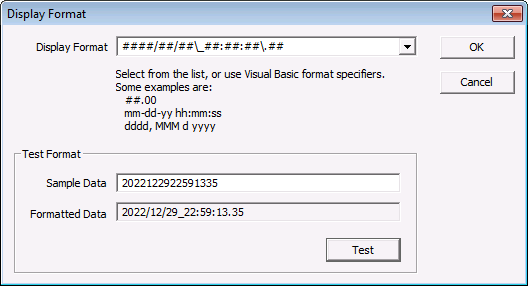
Certain Service Monitor (SVCMON) points report date/time information in a string format. This information can be displayed on a CygNet Studio tool with the [DisplayFormat] property, but it is difficult to read in string format. An example of a string-format date/time is 2023032922591335. If you use the following instructions to change the display format, a string date/time 2023032922591335 displays as 2023/03/29_22:59:13.35.
Common tools with the [DisplayFormat] property include the Text Tool, Button Tool, DDS Editor Button, LED Switch Tool, Ribbon Tool, Sliding Scale Tool, and the UIS Command Button Tool.
To Clearly Display Service Monitor Point Date/Time
- Right-click on an object in TheView to open the object's Property Sheet.
- On the Property Sheet, select [DisplayFormat].
- Click … to open the Display Format dialog box.
- In the Display Format field, type the following:
####/##/##\_##:##:##\.##
- Type your string-format date/time into the Sample Data field and click Test. If the date/time appears correct in the Formatted Data field, proceed.
- When you are done, click OK.
|
Display Format Dialog Box |